
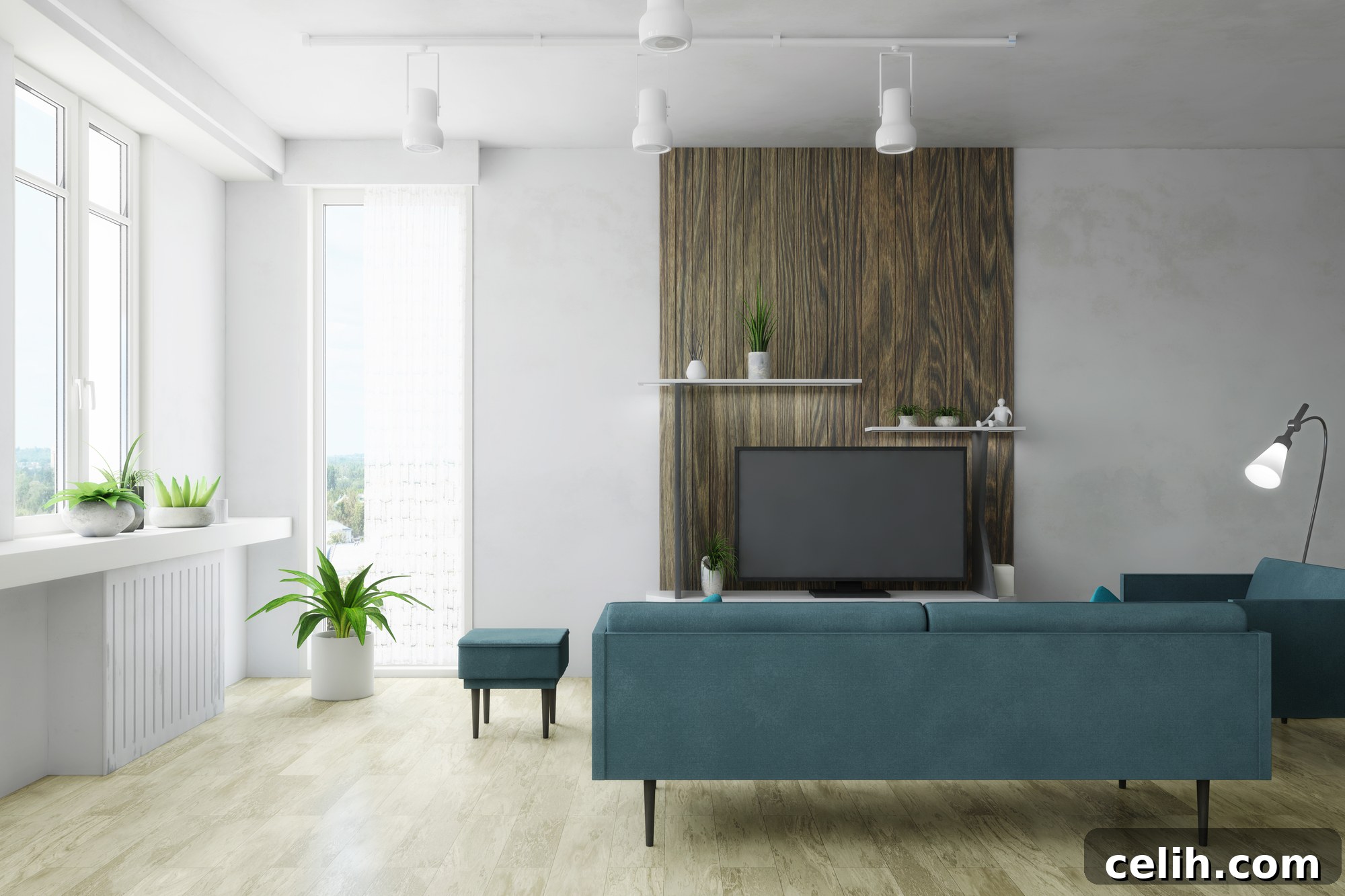
In the dynamic worlds of architecture, interior design, and real estate, the ability to effectively communicate a vision is paramount. Few tools accomplish this with the impact and clarity of photorealistic renderings. These compelling visualizations serve as a bridge between abstract concepts and tangible reality, allowing clients, investors, and stakeholders to experience spaces long before they are physically constructed. By mastering the art of creating superior 3D photorealistic renderings, professionals can elevate their presentations, manage expectations with precision, and foster a deeper understanding of their designs. This comprehensive guide will explore the profound significance of high-quality renders, detail the intricate process behind their creation, and offer invaluable tips to help you perfect the craft of generating stunningly realistic 3D models and visualizations.
The Indispensable Role and Broad Relevance of 3D Photorealistic Rendering
3D photorealistic renderings have emerged as a transformative force across a multitude of professional domains, providing an immersive and highly effective means to visualize, communicate, and market ideas. Their profound impact stems from their ability to translate complex design intentions into easily understandable and emotionally resonant visuals, significantly streamlining decision-making and accelerating project progression.
For **interior designers**, applying sophisticated photorealistic rendering techniques allows them to bring their creative concepts to life with unparalleled realism. This empowers clients to envision not just the layout, but the very ambiance, texture, and mood of a proposed space. From material selections for flooring and finishes to furniture placement and lighting schemes, renders help clients truly “feel” the design, ensuring alignment with their vision and minimizing costly revisions down the line. It transforms a client’s understanding from an abstract idea into a tangible, inviting environment.
**Architects**, by leveraging advanced 3D rendering software, can produce highly detailed and realistic visualizations of their architectural designs. These renders are crucial for presenting their vision to clients, engaging local communities for planning approvals, and providing precise guidance to construction teams. They effectively communicate intricate structural details, material choices, and the interplay of light and shadow, fostering a comprehensive understanding that traditional blueprints or 2D drawings simply cannot achieve. This ensures all stakeholders are on the same page, reducing misunderstandings and enhancing collaboration.
In the competitive realm of **real estate**, 3D renders offer an undeniable advantage. Property developers and real estate agents can utilize these compelling visuals to showcase both existing properties and future developments in a lifelike context. This enables potential buyers to explore unbuilt homes, visualize renovation possibilities, or see commercial spaces in full operation, significantly enhancing marketing efforts and expediting sales cycles. The emotional connection forged through these realistic depictions gives agents a significant edge in attracting and converting leads.
Beyond these core professions, the benefits extend to product design, urban planning, and even film production, where visualization is key. In essence, a professional 3D photorealistic rendering service is not merely a luxury but an indispensable tool for contemporary professionals. It equips them to present their ideas in a more engaging, persuasive, and ultimately, comprehensible manner, fostering trust and driving successful outcomes.
The Meticulous Process of Crafting a Photorealistic Rendering
Creating a truly photorealistic rendering is a multi-stage process that combines technical expertise with artistic sensibility. Each step builds upon the last, progressively transforming a conceptual idea into a stunningly lifelike image. Here’s a detailed breakdown:
- 3D Modeling. The journey of 3D rendering begins with the meticulous construction of a digital 3D model. This foundational step involves using specialized software to build a virtual representation of the architectural project. Whether it’s a building, an interior space, or a product, the model must precisely mirror its real-world counterpart, capturing every dimension, curve, and structural detail. Architects, interior designers, and other stakeholders rely on this digital blueprint to ensure accuracy and fidelity. This stage often involves importing CAD or BIM data, which provides a highly accurate starting point for the intricate modeling process. Attention to detail here is paramount, as any inaccuracies will propagate through subsequent stages.
- Texturing. Once the geometric model is complete, the next critical step is texturing. This involves applying realistic surface materials to the 3D model, mimicking how light interacts with various surfaces in the physical world. Instead of simple colors, textures incorporate detailed information like diffuse color, roughness, metallic properties, normal maps for surface bumps, and displacement maps for true geometric deformation. Selecting high-resolution textures and mapping them correctly onto the model is vital to achieve significant realism, making the final image appear as if it were a photograph. This stage transforms a bland, grey model into a rich, tactile representation of reality, from the subtle grain of wood to the reflective sheen of polished metal.
- Lighting. After texturing, the scene is illuminated in a way that authentically emulates real-life lighting conditions, recognizing the profound emotional connection light evokes. This involves carefully considering various aspects such as light intensity, color temperature, direction, and the intricate interplay of light and shadow. Professionals utilize global illumination techniques, physically based lights (like sun and sky systems, or specific artificial light sources), and High Dynamic Range Images (HDRIs) to create convincing ambient and direct lighting. The goal is to accurately reproduce how light would behave in the actual environment, whether it’s the warm glow of an evening sun, the crisp brightness of a midday sky, or the soft ambiance of interior fixtures.
- Rendering. This is the computational powerhouse of the process, where the textured and lit 3D model is transformed into the final 2D image. High-resolution 3D rendering programs calculate how light rays interact with every surface and pixel in the scene. This complex calculation involves tracing millions of light paths, simulating reflections, refractions, and shadows based on the materials and lighting defined in previous steps. Depending on the software and desired quality, this step can be highly resource-intensive and time-consuming. The output is a high-fidelity image, often referred to as a “raw render,” which captures the essence of the scene before final refinements. Modern rendering engines are highly optimized, allowing for stunning outputs even on powerful workstations.
- Post-processing. The final stage, post-processing, is where a good render is elevated to an exceptional one. After the initial rendering, the image is refined and enhanced using image editing software. This involves a range of adjustments, including color correction, contrast enhancement, sharpening, adding subtle atmospheric effects (like fog or haze), depth of field, and correcting any minor imperfections or noise from the rendering process. Crucially, post-processing can also involve compositing in additional elements like people, vehicles, or vegetation to bring the scene to life and add a sense of scale and realism. This meticulous final touch ensures that the end result is a polished, high-quality, and truly photorealistic depiction of the architectural design, ready for presentation.
Photorealistic vs. Non-Photorealistic Rendering: A Tale of Two Approaches
The fundamental distinction between photorealistic and non-photorealistic rendering (NPR) lies in their core objective: the intended level of realism and artistic expression. While both leverage the power of computer graphics, their applications and visual outcomes vary significantly.
Non-photorealistic renderings deliberately depart from realism to achieve a stylized, artistic, or conceptual effect. This approach often mimics traditional art forms like sketches, watercolors, cartoons, or line drawings. NPR is frequently employed in video gaming for unique aesthetics, in animation for distinct visual styles, and in illustration. In architecture and real estate, while less common than photorealism, NPR can be incredibly valuable for early-stage conceptual projects. A sketch-like render, for instance, can convey design ideas without distracting clients with material specifics, encouraging feedback on form and layout rather than finish, and signaling that the design is still fluid and open to suggestions.
On the other hand, the pursuit of a **high degree of photorealism** is often the ultimate goal in architectural visualization, interior design, and real estate marketing. This approach aims to create images that are indistinguishable from photographs of a real-world scene. Achieving true photorealism, however, is a sophisticated endeavor that demands not only advanced tools and computing power but also considerable expertise and artistic skill from the renderer. Factors such as accurate material properties, realistic lighting simulation, precise camera settings, and meticulous post-production are critical. Due to the complex nature of creating truly life-like 3D models and scenes, it is highly advisable to invest time in researching and hiring a proven professional when seeking photorealistic 3D rendering services. Their experience not only ensures the production of desired images from various angles and conditions but also safeguards your brand’s reputation with potential clients by delivering consistently high-quality visuals.
Both rendering types utilize advanced computer graphics software and techniques for image creation. The precise calibration of light, including photometric lighting for real-world accuracy, and the strategic management of camera position to capture the perfect perspective are integral parts of the design process, regardless of the rendering style. The choice between these two types of 3D modeling primarily depends on the project’s specific needs, its stage of development, and the anticipated outcome or message. Subtle details like chromatic aberration, lens flare, or depth of field can significantly enhance the perceived realism of the final image in photorealistic renderings, making them more immersive. Despite their stylistic disparities, both photorealistic and non-photorealistic methods serve unique and essential purposes, acting as powerful tools in the diverse landscape of modern digital design and visualization.
Leading Software Choices for Realistic Rendering
The quality of a photorealistic render is heavily influenced by the software and rendering engines employed. Here are some of the industry’s most respected choices:
- 3ds Studio Max: Widely regarded as an industry standard, 3ds Max is an incredibly powerful 3D modeling, animation, and rendering software from Autodesk. It stands out for its robust modeling capabilities, extensive toolset for creating complex scenes, and its capacity to deliver top-quality results in photorealistic architectural rendering. Its versatility is further enhanced by a vast ecosystem of plugins, making it a go-to choice for detailed and complex visualizations.
- Lumion. Renowned for its speed and ease of use, Lumion is a real-time 3D rendering software specifically designed for architects and interior designers. It allows users to quickly convert 3D models into beautiful, photorealistic images and videos with minimal effort. While it might offer a slightly different level of absolute realism compared to some purely offline renderers, its intuitive interface, vast library of assets, and rapid rendering times make it an invaluable tool for conceptual visualization and quick client presentations.
- V-Ray. Developed by Chaos Group, V-Ray is a highly versatile and powerful rendering engine that is often used as a plugin with 3ds Max, SketchUp, Rhino, Revit, and other 3D software. V-Ray boasts advanced features crucial for photorealism, including sophisticated global illumination algorithms, physically based camera models, accurate material simulations, and advanced lighting controls. It is celebrated for its ability to produce incredibly realistic and high-quality outputs, making it a favorite among professional visualization studios.
- Corona Renderer. Known for its user-friendly interface and relatively fast, unbiased CPU-based rendering, Corona Renderer has gained significant popularity. It offers advanced lighting and shading features that contribute significantly to creating an incredibly realistic final image with minimal setup. Its approach to light simulation is highly natural and intuitive, allowing artists to achieve stunning photorealistic results without an overly steep learning curve, making it appealing for both experienced professionals and those new to advanced rendering.
- Blender Cycles. Integrated within Blender, the powerful open-source 3D creation suite, Cycles is Blender’s physically based path tracer rendering engine. Popular in the animation and visual effects industries, Cycles is also highly capable of producing impressive photorealistic architectural renders. Its node-based shader system provides immense flexibility for creating complex materials, and its continuous development within the Blender community ensures ongoing improvements and new features.
Expert Tips for Crafting Truly Realistic Renderings
Achieving photorealism in 3D rendering is a nuanced art that goes beyond simply pressing a “render” button. It requires a keen eye for detail and a deep understanding of how light, materials, and composition interact in the real world. Here are some top tips to help you elevate your renderings to a new level of realism:
Mastering Lighting Considerations
Lighting is arguably the single most critical element that can make or break a photorealistic 3D rendering. Simulating real-time lighting conditions accurately is essential for enhancing photorealism and ensuring the final result is impressive and authentic. This involves not just placing light sources but understanding their physical properties. The types of photorealistic lighting should meticulously mimic those found in real life, capturing intensity, direction, color temperature, and the subtle interplay of bounced light (global illumination) with precision. Experiment with different times of day (morning, midday, dusk) and weather conditions to evoke distinct moods. Pay close attention to how shadows are cast—soft or hard, long or short—as they provide crucial cues about the light source and environment, adding depth and realism to your scene.
Embracing Surface Imperfections
In the real world, perfectly pristine, smooth, and blemish-free surfaces are exceedingly rare, existing mostly in showrooms. The human eye is accustomed to seeing subtle imperfections on nearly every surface. Adding small, nuanced surface imperfections to your 3D models can dramatically increase the level of realism in your final render. This includes subtle scratches, dust particles, fingerprints, smudges, unevenness in a painted wall, or slight wear and tear on a wooden floor. These details, often overlooked, break up the artificial perfection of a digital render, making the materials appear aged, used, and authentic. Utilizing advanced texture maps like roughness, normal, and displacement maps can effectively simulate these imperfections without adding significant geometric complexity, breathing life into otherwise sterile surfaces.
Prioritizing Proper Scaling of Objects
Proper scaling and proportion are absolutely crucial when constructing 3D models and populating your scene. Every object placed within the rendering should correspond accurately to its real-life size and scale in relation to its surroundings. Incorrectly scaled objects, even by a small margin, can instantly break the illusion of realism, making a space feel awkward, cramped, or unnaturally vast. For example, furniture that is too large for a room, or doors that are disproportionately small, will immediately signal to the viewer that something is amiss. Always reference real-world dimensions and use accurate 3D models for furniture, fixtures, and human figures to maintain consistency and ensure the scene feels believable and lived-in. This attention to detail reinforces the sense of authenticity and immerses the viewer more deeply into the visualization.
Strategic Use of Camera Angles and Composition
The choice of camera angle and overall composition can dramatically influence the perception of the architectural space, storytelling, and the emotional response of the viewer. Simply placing a camera at eye level isn’t always enough. Utilize a variety of strategic angles to fully display the object, highlighting key features and showing every important detail before starting construction. Experiment with different focal lengths to control perspective distortion; a wider lens can emphasize grandeur, while a longer lens can compress depth and create a more intimate feel. Apply principles of photography, such as the rule of thirds, leading lines, and negative space, to create visually engaging compositions. Ideal camera angles in real estate rendering, for instance, would reveal the space’s functionality, highlight its attractive selling points, and create a sense of invitation, ultimately enhancing the photorealistic 3D effect and captivating potential clients.
High-Quality Assets and Detailing
The realism of your render is only as good as the assets you use. Investing in high-quality 3D models for furniture, decor, vegetation, and human figures is paramount. Low-polygon or poorly textured assets will detract from the overall photorealism. Furthermore, attention to small details makes a scene truly come alive. This includes adding everyday objects like books, coffee cups, remote controls, magazines, or even subtle dust motes floating in sunbeams. These seemingly minor elements contribute significantly to making a rendered space feel authentic, lived-in, and relatable, bridging the gap between a digital creation and a real-world environment.
Environmental Context and Backgrounds
A building or interior doesn’t exist in isolation. Integrating realistic environmental context and backgrounds is vital for grounding your render in reality. For exterior shots, this means adding surrounding buildings, realistic landscaping (trees, shrubs, grass), and a convincing sky with clouds. For interiors, ensuring that what’s visible through windows appears realistic and consistent with the exterior environment is crucial. Using high-resolution HDRIs for sky and lighting can provide both realistic illumination and a natural background, tying the scene seamlessly into its imagined location. A well-integrated background enhances depth and makes the primary subject feel part of a larger, believable world.
Conclusion: The Power of Perfected Photorealism
The ability to produce top-notch 3D photorealistic renderings is no longer just a desirable talent; it has become an indispensable competency across various industries, including real estate, architecture, and interior design. As businesses increasingly appreciate their immense potential to deeply engage viewers, vividly communicate complex concepts, and significantly influence decision-making, the demand for such high-quality visualizations continues to surge. These renders transcend language barriers and technical jargon, offering an immediate and profound understanding of any project.
Achieving true photorealism requires a masterful blend of technical proficiency, an understanding of real-world physics, and a refined artistic vision. It is a process that demands precision, patience, and a deep commitment to detail, transforming digital data into captivating visual stories. When executed flawlessly, photorealistic renderings become powerful marketing tools, critical design validation instruments, and compelling narrative devices that can inspire confidence and drive success.
If you’re looking to elevate your projects with professional, cutting-edge 3D renderings that truly stand out, consider leveraging expert services. For unparalleled expertise in photorealistic renderings that bring your visions to life with exceptional realism and quality, explore the offerings of Fortes Vision 3D Visualization Studio. Their dedicated team can translate your concepts into stunning visuals, saving you valuable time, ensuring competitive results, and providing a significant advantage in today’s visually-driven market.