
The landscape of work has undergone a significant transformation in recent years, with an increasing number of professionals opting for the flexibility and convenience of working from home. Whether you’re an entrepreneur launching a new venture, a seasoned employee keen to escape the daily commute, or simply seeking a more focused environment away from a bustling traditional office, establishing a functional and inspiring home office space is paramount. This shift to remote work offers unparalleled opportunities for work-life balance, autonomy, and increased productivity, provided you set up your environment thoughtfully. Creating an ideal home office isn’t just about finding a corner for your laptop; it’s about designing a dedicated sanctuary that fosters concentration, supports your well-being, and empowers you to excel in your professional endeavors.
Embarking on the journey of setting up your home office can be both exciting and rewarding. However, it requires careful consideration of several practical aspects to ensure your space is not only visually appealing but also highly functional and conducive to long-term productivity. This comprehensive guide will walk you through the essential steps and key considerations for transforming a part of your home into a thriving professional hub, helping you maximize your efficiency and enjoyment of working remotely.
The Rise of Remote Work: Why a Home Office is Essential
The global embrace of remote work has highlighted the critical need for a well-designed home office. Beyond the obvious benefit of eliminating commuting time and costs, working from home offers a unique opportunity to tailor your environment to your personal work style. However, to truly reap these benefits, a casual setup won’t suffice. A dedicated home office is essential for several reasons:
- Enhanced Productivity: A designated workspace minimizes distractions inherent in shared living areas, allowing for deeper focus and uninterrupted work sessions.
- Clear Boundaries: It helps create a mental and physical separation between your work life and home life, preventing burnout and promoting a healthier work-life balance.
- Professionalism: A structured environment contributes to a more professional mindset, even when you’re just stepping a few feet from your bedroom. It’s also vital for virtual meetings and client interactions.
- Ergonomic Support: Unlike makeshift setups, a proper home office allows for ergonomic furniture and equipment, safeguarding your health and comfort during long working hours.
- Organization: A dedicated space provides a permanent home for your work files, equipment, and supplies, keeping your professional life organized and your living areas uncluttered.
Understanding these fundamental advantages underscores the importance of investing time and effort into creating a purposeful home office.
Step 1: Defining Your Dedicated Workspace
The very first item on your home office checklist should be to identify and establish a space that is unequivocally dedicated to work. This isn’t just a physical boundary; it’s a psychological one.
Beyond the Kitchen Table: The Imperative of a Separate Zone
While the kitchen table or a corner of the living room might seem like convenient temporary solutions, they are far from ideal for sustained productivity and well-being. These areas come with a myriad of distractions – from the tempting aroma of coffee brewing to the constant hum of household activity. More importantly, they often lack the ergonomic support necessary for comfortable, long-term work, potentially leading to back pain, neck strain, and overall discomfort. To work successfully from home and truly maximize your time and output, you need to set aside a space that is exclusively for work, where you can “close the door,” both physically and mentally, to the outside world.
Choosing the Ideal Location within Your Home
The perfect home office location balances practicality with personal preferences. Look around your home and consider areas where there is less noise, fewer interruptions, and ample natural light. Here are key factors to evaluate:
- Noise and Distractions: Identify the quietest part of your home. This might be a spare bedroom, a seldom-used attic, or even a section of your basement. The goal is to minimize interruptions from family members, pets, or external street noise.
- Natural Light: Prioritize a spot with good natural light. Sunlight not only boosts mood and energy levels but also reduces eye strain. Position your desk so that natural light comes from the side, rather than directly in front or behind you, to avoid glare on your screen.
- Artificial Lighting: Beyond natural light, ensure the area has access to adequate artificial lighting. This includes general ambient lighting for overall illumination and crucial task lighting, such as a desk lamp, to directly illuminate your workspace.
- Power Outlets: You’ll need plenty of easily accessible plug sockets for your computer, monitor(s), printer, and other electronic devices. Planning for these from the outset will prevent a tangled mess of extension cords later.
- Connectivity: A strong and reliable internet connection is non-negotiable for remote work. Choose a spot with excellent Wi-Fi signal or, even better, the option for a direct Ethernet connection for maximum stability and speed.
- Privacy: If your work involves frequent video calls or sensitive discussions, a space that offers visual and auditory privacy is crucial. A room with a door that can be closed is ideal, but even a clever room divider or screen can help create a sense of enclosure.
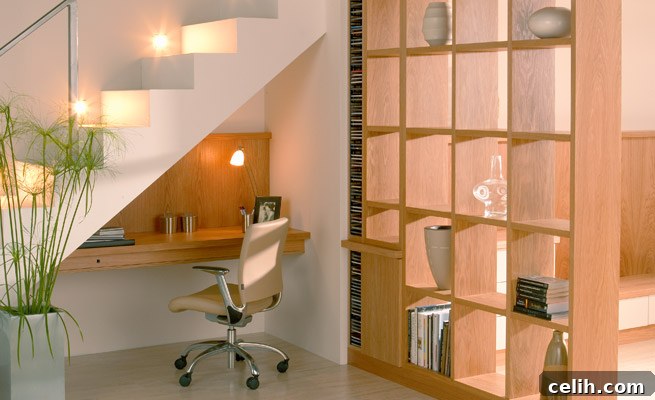
For those with limited space, a dedicated corner of a spare bedroom can work wonders. However, if your home allows, converting an entire room into an office provides the ultimate flexibility and separation, allowing you to fully immerse yourself in your work environment.
Step 2: Designing Your Ergonomic and Efficient Workspace
Once you’ve chosen your dedicated spot, the next critical step is to furnish it with items that promote comfort, efficiency, and long-term health.
The Foundation: Your Desk
Your desk is the central command center of your home office. Its size, shape, and features will significantly impact your workflow and comfort. When selecting a desk, consider:
- Size and Shape: A large desk unit with integrated drawers can minimize the need for separate storage, especially if it offers drawers capacious enough for files. For larger spaces, a U-shaped workspace provides three distinct worktops, keeping everything within easy reach. If your space is more compact or nestled in a corner, an L-shaped desk works exceptionally well, maximizing your usable surface area without overwhelming the room.
- Standing Desks: Consider a standing desk or a sit-stand converter. Alternating between sitting and standing throughout the day can improve circulation, reduce back pain, and increase energy levels.
- Material and Durability: Choose a desk made from durable materials that can withstand daily use. Look for stable construction that won’t wobble.
- Cable Management: Desks with built-in cable management solutions or grommets can help keep your wires tidy and prevent clutter, contributing to a more organized and aesthetically pleasing workspace.
A quick look online will reveal a range of home office furniture that is both practical and affordable, with plenty of options to make your workspace more productive and tailored to your specific needs.
The Cornerstone: Your Ergonomic Chair
Whatever you do, do not skimp on your office chair. This is arguably the most crucial investment for your home office. You will likely be spending a minimum of eight hours a day, and often more, sitting in it, especially as you get your business or projects off the ground. An inferior chair can lead to chronic back pain, poor posture, and decreased productivity, impacting your health and ultimately your work quality.
It is essential that you invest in a chair that offers plenty of ergonomic support for your neck, back, and arms. Look for features such as:
- Adjustable Height: To ensure your feet are flat on the floor and your knees are at a 90-degree angle.
- Lumbar Support: A chair that supports the natural curve of your lower back, preventing slouching.
- Adjustable Armrests: To support your arms and shoulders, reducing strain.
- Tilt Mechanism: Allowing you to recline and shift your posture throughout the day.
- Breathable Material: For comfort during long hours.
- Swivel and Wheels: For easy movement around your workspace.
Think of your ergonomic chair as an investment in your long-term health and productivity, not just an expense.
Optimizing Your Setup: Monitors, Peripherals, and Accessories
Beyond the desk and chair, other equipment significantly contributes to an efficient workspace:
- Monitor Setup: Position your monitor(s) at arm’s length, with the top of the screen at or slightly below eye level. If using multiple monitors, arrange them ergonomically to minimize neck movement.
- Ergonomic Keyboard and Mouse: Consider investing in an ergonomic keyboard and mouse to prevent wrist strain and carpal tunnel syndrome, especially if you type extensively.
- Cable Management: Use cable ties, sleeves, or organizers to keep cords tidy and out of sight. A clean workspace contributes to a clear mind.
- Printer and Scanner: Depending on your profession, you may need a compact multi-function printer/scanner. Position it within easy reach but not so close that it takes up prime desk real estate.
Step 3: Storage and Organization Solutions
A cluttered office can lead to a cluttered mind. Effective storage and organization are vital for maintaining a productive environment.
Beyond the Desk: Keeping Your Office Tidy
- Filing Systems: Whether physical or digital, establish a robust filing system. For physical documents, a filing cabinet or mobile pedestal with lockable drawers is excellent. For digital files, implement a clear folder structure and use cloud storage for accessibility and backup.
- Shelving Units: Wall-mounted shelves or freestanding bookcases can provide ample storage for books, binders, and decorative items without taking up much floor space.
- Drawer Organizers: Keep small office supplies like pens, paper clips, and sticky notes neatly organized within drawers using dividers or small trays.
- Vertical Storage: Maximize vertical space with stackable trays or wall organizers, especially in smaller offices.
- Decluttering: Regularly purge unnecessary items. A minimalist approach often leads to a more focused and stress-free workspace.
Step 4: Lighting, Aesthetics, and Personalization
Your office should be a place where you feel comfortable and inspired, not just productive.
Illuminating Your Productivity: Lighting Strategies
- Maximize Natural Light: As mentioned, natural light is a powerful mood booster. Keep windows unobstructed and use sheer curtains or blinds to control glare without blocking light entirely.
- Layered Artificial Lighting: Combine different types of artificial lights:
- Ambient Lighting: Overhead lights or floor lamps provide general illumination for the room.
- Task Lighting: A good desk lamp is essential for focused work, reducing eye strain.
- Accent Lighting: Can highlight artwork or plants, adding depth and warmth to the room.
- Avoid Harsh Lights: Opt for soft, diffused lighting over harsh, direct overhead lights that can cause shadows and glare.
Creating an Inspiring Environment
- Color Psychology: Choose wall colors and decor that promote focus and calm. Neutral tones like soft grays, blues, and greens are often recommended for their calming properties, while splashes of brighter colors can add energy.
- Personal Touches: Incorporate elements that make the space feel uniquely yours, such as plants (known to improve air quality and mood), artwork, or a few meaningful photographs. Be mindful, however, of keeping these personal items from becoming sources of distraction.
- Ventilation and Temperature: Ensure your office space has good airflow and a comfortable temperature. Stale air and extreme temperatures can significantly impact your concentration.
- Acoustics: If noise is an issue, consider acoustic panels, heavy curtains, or even a white noise machine to help create a quieter environment.
Budgeting for Your Home Office
When you’re just starting off, you don’t need to spend a huge amount of money to set up a functional home office. However, at the same time, it’s worth spending as much as you can afford to get furniture and equipment that is comfortable, durable, and will last you for several years. Prioritize the ergonomic essentials like your chair and desk.
Consider looking for deals, second-hand quality furniture, or even DIY solutions for non-critical items. Remember, you can always upgrade components over time as your needs evolve and your budget allows. Also, be aware that home office expenses can sometimes be tax-deductible; it’s always wise to consult with a tax professional to understand what applies to your specific situation.
Maintaining Productivity and Work-Life Balance
Finally, a perfect home office setup is only half the battle. To truly thrive, you must also adopt habits that support productivity and prevent burnout:
- Set a Routine: Establish regular work hours and stick to them as much as possible.
- Take Regular Breaks: Step away from your desk, stretch, or take a short walk to refresh your mind and body.
- Set Boundaries: Communicate your work hours to family members or housemates to minimize interruptions. When the workday is over, physically and mentally step away from your home office.
- Stay Connected: While your home office offers solitude, remember to stay connected with colleagues and professional networks to avoid isolation.
Conclusion
Creating an effective and inspiring home office is an investment in your career, your well-being, and your overall quality of life. By thoughtfully addressing the practical considerations of space, ergonomics, organization, and aesthetics, you can transform any corner of your home into a powerhouse of productivity and creativity. Embrace the journey of designing a workspace that not only meets your professional needs but also brings you joy and comfort every single day.
Best of luck with working from home!
***This is a guest post***